- Overhead Costs: Ensure your pricing structure covers all the operational costs of running your business. This includes expenses such as vehicle maintenance, fuel, insurance, tool and equipment upkeep, and transportation.
- Profit Margins: To grow your business, you must be profitable. Build your ideal profit margins directly into your prices to ensure you remain competitive while also achieving your financial goals.
Flat Rate vs. Time & Material (T&M)
Understanding when to apply each pricing model is key.
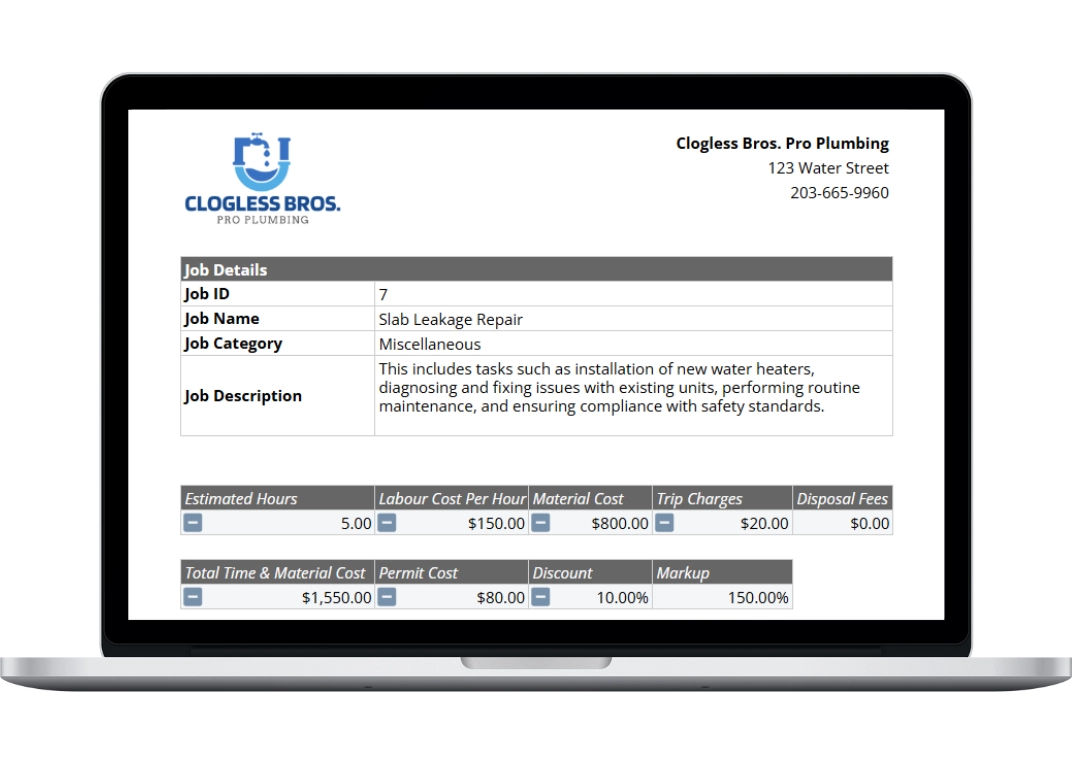
Flat Rate Pricing, which this template facilitates, offers customers transparent, upfront costs before work begins. This model builds confidence and allows you to price jobs based on your expertise, not just the hours spent.
Time & Material (T&M) Pricing is often better for highly complex or unpredictable jobs where the scope is unknown. This traditional model allows you to charge for the actual hours worked and materials used on the project.
Ultimately, transparency is the key to building customer trust. This template helps you present clear, professional pricing that reduces confusion, regardless of the method you choose.
Getting Started with Your Free Plumbing Price List Template
Our Google Sheet price list template is designed to be comprehensive yet simple, helping you standardize your pricing for consistency and profitability. Follow these steps to build a professional price list for your business. For your convenience, a copy of these instructions is also included on the ‘Instructions’ tab within the Google Sheet.
To get started, fill out the form on this page and hit download. You will receive an email containing a link to the Google Sheet, then you can follow the next steps.
Important First Step: Make a Copy of the Template Before you begin, you must save a copy of the Google Sheet to your own Google Drive. The original template you receive is view-only. This ensures every user starts with a clean, original version.
To make your own editable copy, simply:
- Open the Google Sheet.
- Go to the File menu in the top-left corner.
- Select Make a copy. Your new, editable version will open, and you can now follow the steps below.